
Joining Agate
Your family’s path to Agate
Start with your learner. Explore the support, ask your questions and take the next step when your family is ready.
A conversation comes before a commitment. Creating a website account is separate from school enrolment.
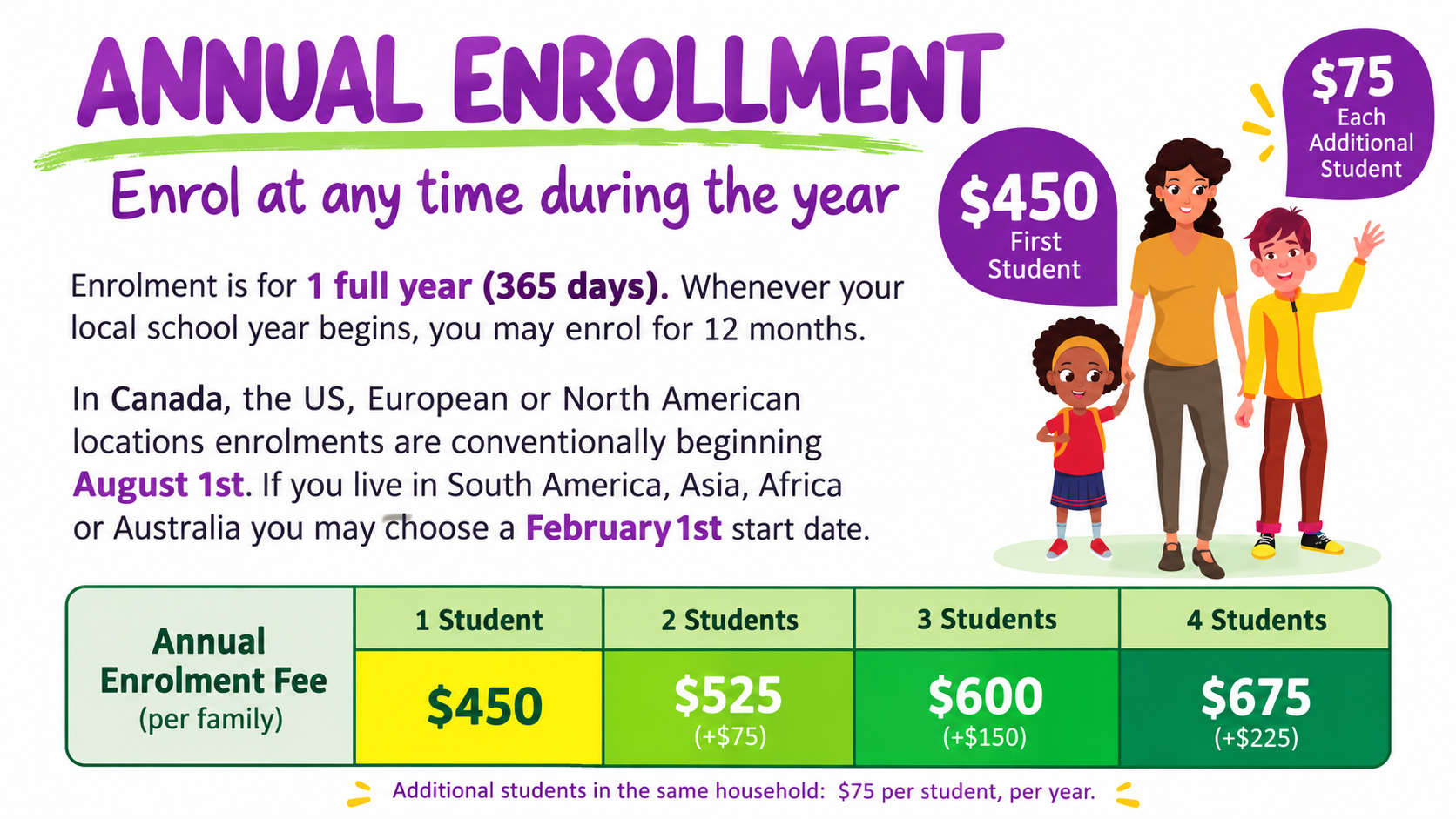
$450 CAD for your first learner + $75 CAD for each additional learner, per year. Estimate your family’s fees.
Your planning checklist
Use the checks to keep your place. They are saved in this tab only; they do not submit an application or confirm acceptance.
0 of 14 checks marked
Explore the schoolUnderstand the approach, support and costs.
Agate supports self-directed education for primarily independent learners. We facilitate learning and offer guidance without operating a central campus or physical classrooms. Learners can follow interests, projects, courses and experiences from any source—not only Agate programs.
We offer guidance, resources, learning records, mentoring and opportunities to connect. Talk with us about your learner’s age, location, interests and the support your family needs so we can explore whether Agate is a suitable fit.
We help learners and families find like-minded families and resources locally and further afield, drawing on our AERO membership and associations with OFTP, the Alliance for Self-Directed Education and other alternative-education networks.
Ask your questionsTalk about your learner and what you need.
Tell us what is working for your learner, what you hope to change and which kinds of support would help. Bring their questions and preferences into the conversation too.
The Education Responsibility Survey helps you explain your approach to learning and the responsibilities involved. Agate uses that information as part of the conversation about a suitable fit; it is not a promise of acceptance.
Send your applicationApply from your phone, tablet or computer.
When you are ready, complete the school application. Have your learner’s details, interests and your questions about support available as you work through it.
The application is hosted by Microsoft Forms. Read our privacy information before sending personal details. Agate will explain which supporting records are needed and how to provide them.
Applying to the school is separate from creating a LearnFree.ca account. A website account does not confirm a school place.
Hear from Agate and make a planApplication review, first mentoring and payment options.
After your application is submitted, Agate reviews it and reaches out to the parents to schedule the first mentoring appointment and explain payment options.
You can pay school fees by e-transfer or card, or discuss an instalment arrangement. Agate will confirm the amount, payment instructions and any agreed instalment dates directly with you.
Together, you and Agate confirm the next steps for your family. If Agate cannot provide the support you need, we can discuss alternatives.
School-fee arrangements are made with Agate. The shop is for separate products and services; it is not the school-enrolment payment step.
Complete enrolment and get connectedSet up family access and begin sharing learning.
Once Agate confirms your family’s enrolment arrangements, follow the instructions provided for the enrolment package and supporting documents. Ask for help if printing, scanning or access is a barrier.
Documents may include a birth certificate, relevant custody orders, learner and educator ID photos, and an OSR transfer letter where applicable. Agate will confirm what your family needs and when to send it.
Agate’s Ontario Student Record (OSR) service applies to learners in Ontario, primarily those who have previously attended public education. Where applicable, Agate acts as custodian of the learner’s OSR, maintains it in accordance with Ministry of Education guidelines and handles required Ministry reporting. We explain whether an OSR applies and any records needed from a previous school.
Parents create their own LearnFree.ca website account using their own email address. Agate issues each learner’s separate @ms.learnfree.ca Microsoft account. If that school address has not arrived, contact Agate before trying to add the learner.
In your family dashboard, choose Add your first learner and enter the learner’s name and school-issued address. Their LearnFree.ca invitation goes to that address so they can finish setting up their own website account. Microsoft school-service sign-in and LearnFree.ca sign-in are separate.
You can invite an optional second parent using Add Parent. Learners choose their own programs and activities; their learning entries are visible to linked parents and Agate staff.
- Open document upload when requested
- View the paper enrolment package
- See current programs
- Check the activity calendar
- School account setup and recovery
Once you have a parent account, these tools are in your family dashboard:
Parents can use any email address. New learner accounts need the school-issued @ms.learnfree.ca address. Need help receiving a school account or opening an invitation? Ask Agate for help.